Lindenmayer, Markov and Semi-Thue Systems
Michael NeumannThis months editon (11/2003) of the German c't magazin contains an article about Lindenmayer systems. I've read about them some years ago in an IBM science journal and implemented them afterwards in OCaml. Today, I want to implement them in Ruby.
Lindenmayer systems are similar to Markov or Semi-Thue systems. Both are very simple text replacement systems, with the only difference that Lindemayer systems apply each matching rules at each production step in parallel, whereas Markov and Semi-Thue systems apply only one rule at a time.
All three systems have in common that they use production rules and a start symbol. Markov systems further have special terminating rules (unlike Semi-Thue) and rules have a specific order in which they are tried. Semi-Thue systems may apply the rules in random order. Due to the specific order, Markov systems are deterministic, Semi-Thue systems usually not. A Markov system is incorrect if no more rules are applicable. It must terminate by explicitly "calling" the terminating rule, usually denoted as dot.
Here's an example of a simple Markov system or algorithm that can substract two numbers:
|-| ::= -
|-  ::= .|
-|  ::= .-|
-   ::= 'e
'e  ::= .'e
The 'e denotes the empty symbol epsilon, the dot . marks a terminating
rule. Read the ::= as bebecomes or produces.
Applying the Markov algorithm onto the start symbol |-|| will lead to:
|-|| ==> -|   (rule 1)
-|   ==> -|   (rule 3)
You see that it correctly subtracts "two" || from "one" I resulting in
"negative one" -|. You can even express any algorithm as Markov or
Semi-Thue system as they are Turing-complete.
During the Computer Science I lecture, I wrote a Markov simulator, which is available here: http://raa.ruby-lang.org/list.rhtml?name=markov
Lindenmayer Systems
Lindenmayer Systems are very similar to Markov systems, with the difference, that at each production step any matching rule is applied in parallel. Look at the following example which should clarify this (the second step is important):
Rules:
  F => (F+F)

Start symbol:
  F

Markov:
  1.  F     => (F+F)
  2.  (F+F) => ((F+F)+F)

Lindenmayer:
  1.  F     => (F+F)
  2.  (F+F) => ((F+F)+(F+F))
The subsitution step of a Lindenmayer system can be written in a few lines of Ruby code:
class String
  def explode; scan(/./m) end
end

class Producer
  def initialize(rules)
    @rules = rules
  end

  def produce(str, n=1)
    n.times { str = str.explode.map {|s| @rules[s] || s}.to_s }
    str
  end
end

# use it
l = Producer.new { "F" => "(F+F)" }
l.produce(start="F", n=2)
Once you have produced a pattern with a Lindenmayer system, you can then interpret every character of it as a command to a turtle graphics engine, for example using the following interpretations:
-
FForward one step with pen down -
fForward one step, but do not draw (pen up) -
+Turn right for a predefined angle -
-Turn left for a predefined angle -
[Push current state on stack (position, angle etc.) -
]Pop state from stack and make it current
Implementing this and the turtle engine is another 100 lines of Ruby code.
Examples
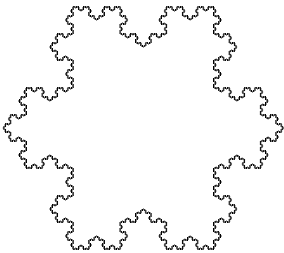
One well known Lindenmayer system is the so called Koch curve. It is
constructed by a single rule F ::= F+F--F+F, the start symbol F--F--F and an
angle of 60 degree for the turtle graphics. The following picture shows a
Koch curve drawn after the 5th iteration.
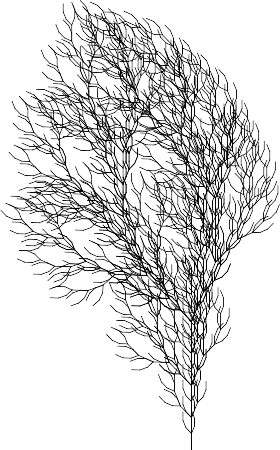
Botanical ferns or grasses are other examples of Lindenmayer systems.
The fern shown below (4th iteration) was constructed by the rule
F ::= FF-[-F+F+F]+[+F-F-F], the start symbol F and an angle of 22 degree.
The grass shown below (7th iteration) was constructed by the two rules
X ::= F[+X][-X]FX and F ::= FF, the start symbol X and an angle of
29.7 degree.
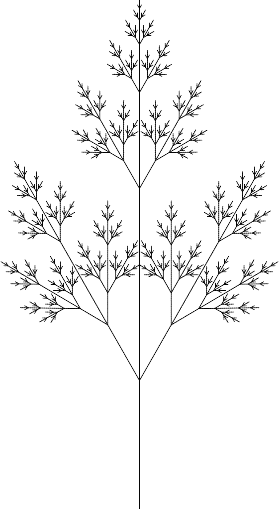
The X symbol as well as all other unknown symbols are ignored by the turtle
graphics engine.
Downloads
You can download the sources for the turtles engine and the Lindenmayer systems here (you must put all sources into one directory):
To view the turtles, you'll need RMagick as well: